Take payments at the bar — with your own phone.
Free account · no credit card · no subscription
€0
rent for POS hardware
0
payment methods: cash, card, NFC wristband
0
tap per drink
0
exports: PDF & CSV
Every phone becomes a register — no rented terminals.
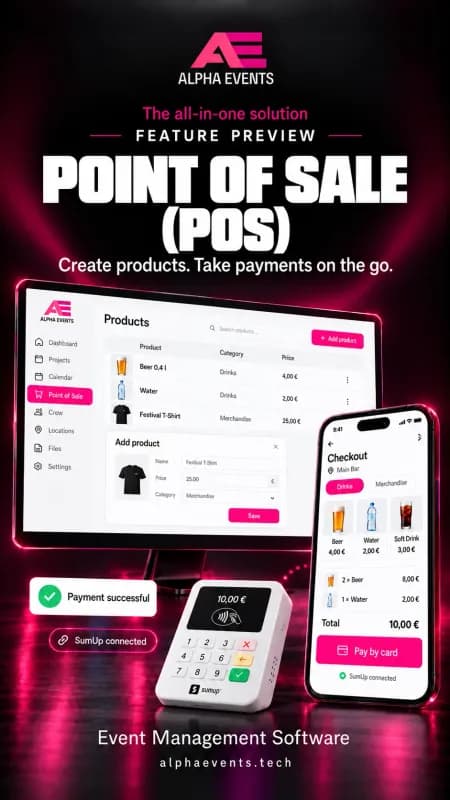
Your team opens the register link in the browser and starts selling. Take cards with a SumUp terminal or the SumUp app.
iPhone
Cash and card payments via SumUp
Android phone
Cash, card and NFC wristbands — top-up included
Tablet
Big register at the bar or merch stand
Laptop & PC
Products, registers, shifts and revenue in the back office
The POS needs an internet connection. NFC payments work on Android with NFC and Chrome.
Your POS in four steps
- 1
Add products
Drinks, food, merch — with prices and categories per register.
- 2
Open the register
Register link on the phone, sign in with event PIN and email.
- 3
Take payments
Tap, pick a tip, cash, card or wristband — done.
- 4
Settle up
Shift report, live revenue and exports for every register.
Everything an event POS needs
Fast at the bar, clear in the accounts.
POS in the browser
Runs on smartphones and tablets — no app, no rented devices.
Card via SumUp
With a paired SumUp terminal or the SumUp app on the phone.
Tips
Pick a tip right at payment — shown cleanly per shift.
NFC wristbands
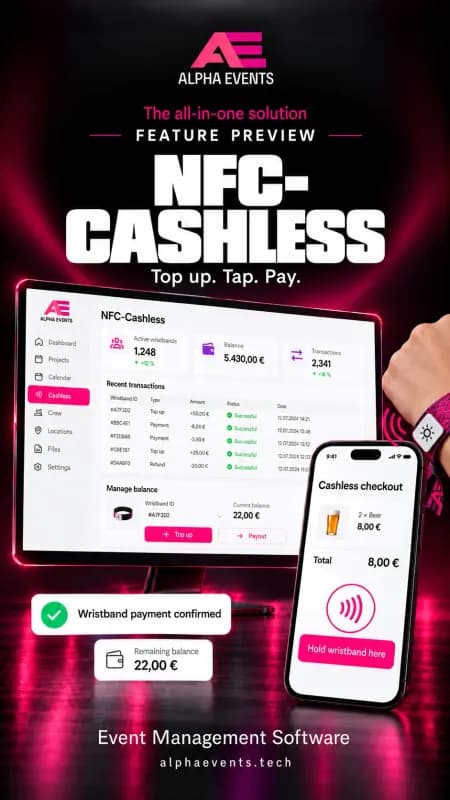
Optionally cashless with a wristband: pay, top up and pay out balances.
Shift reports
Revenue, payment methods and tips per shift and staff member.
Live revenue & exports
Revenue per register, product analysis and PDF/CSV exports per event.
Fast at the bar
Big product tiles, one tap per drink, tips in one click — and a report per register at the end of the shift.
- Separate registers for bar, food and merch
- Payment methods per register freely selectable
- SumUp bills card fees to you directly
Cashless if you like
With NFC wristbands visitors pay with a tap — topped up at the register or online through your Stripe account.
- Almost any NFC chip — wristband, card or sticker
- Pay out balances at the register
- Block lost wristbands — the balance is kept
- Servers in Germany
- GDPR compliant
- Money straight through your Stripe
- Your own devices
- No subscription · pay as you go
Frequently asked questions
Is the POS certified with a TSE?
Which devices do I need?
How do card payments work?
Does the POS work offline?
One platform for your whole event
The POS is one part — with tickets, entry, NFC wristbands and the visitor app it becomes one flow.
Get a guided tour of the software
Book a free video call. We'll show you live how to set up your event with Alpha Events — and answer every question.
Your next event deserves better tooling.
Create a free account and explore every feature. Only pay for what you actually use.
- Free account
- No credit card
- No subscription
- Servers in Germany · GDPR